AI Phone Compliance in Healthcare: Beyond the HIPAA Checklist
This guide covers everything you need to know about HIPAA-compliant AI phone systems, from the specific security requirements and business associate agreements to.



This guide covers everything you need to know about HIPAA-compliant AI phone systems, from the specific security requirements and business associate agreements to practical use cases like appointment scheduling and after-hours triage, so you can confidently automate patient calls without putting your practice at risk.
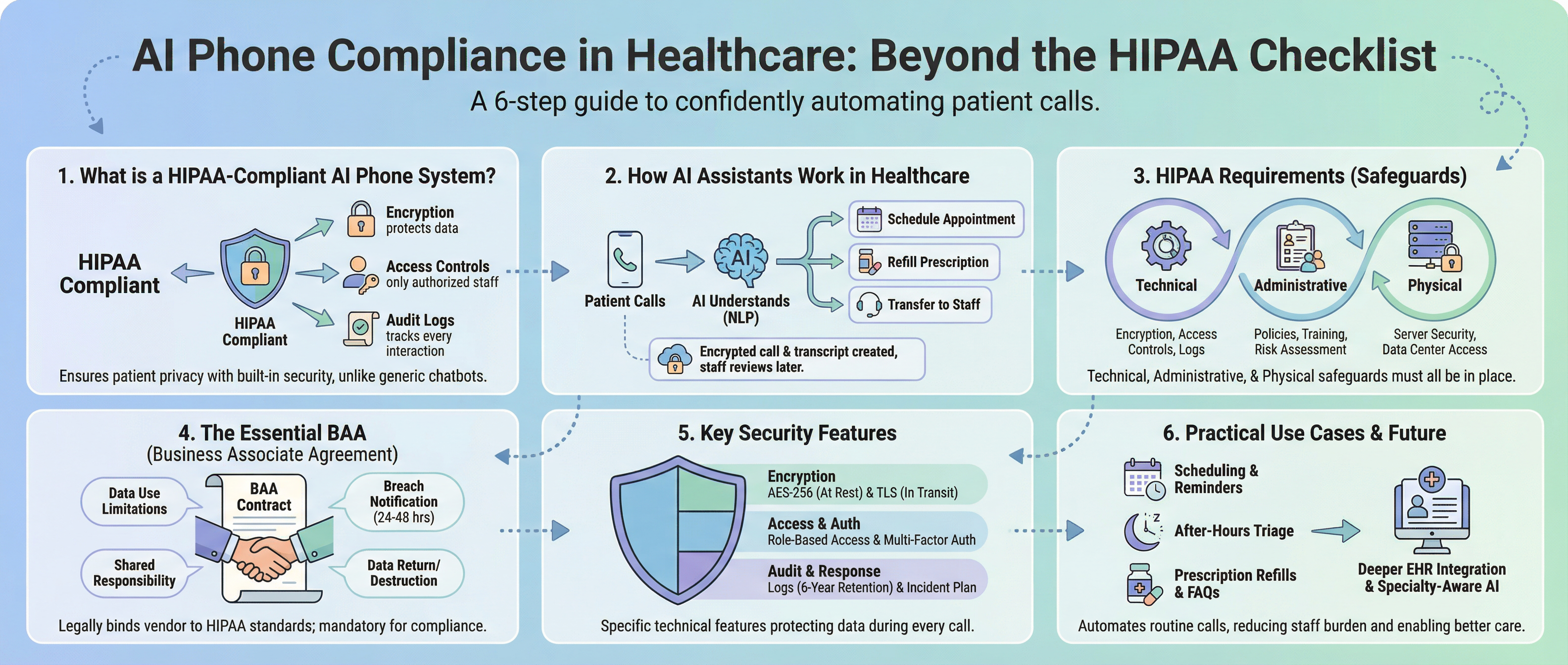
A HIPAA-compliant AI phone system is software that answers patient calls using artificial intelligence while meeting federal privacy and security standards for protected health information. This means every call is encrypted, access to patient data is controlled, and detailed logs track all interactions. Unlike generic AI tools or standard answering services, these systems are built specifically to handle sensitive health information safely.
HIPAA stands for the Health Insurance Portability and Accountability Act. It sets the rules for how healthcare providers must protect patient privacy. When an AI phone system is HIPAA-compliant, it meets these legal requirements for handling patient information during phone calls.
The difference between a HIPAA-compliant system and a regular AI chatbot comes down to three things:
A regular answering service doesn't have these safeguards built in. Using one puts your practice at legal and financial risk, with potential fines reaching $50,000 per violation.
When a patient calls your practice, a HIPAA-compliant AI phone assistant answers immediately. The system uses natural language processing to understand why the patient is calling. Natural language processing is technology that helps computers understand human speech the way we actually talk.
The AI recognizes whether the patient needs to schedule an appointment, refill a prescription, ask a question, or report an urgent issue. Based on the request, it either handles the task automatically or transfers to a human staff member with full context about what the patient already said.
For routine tasks like appointment scheduling, the AI checks your calendar in real time, offers available slots, and confirms the booking. The patient receives a confirmation text. Your staff never has to pick up the phone for these calls.
Throughout this process, every word spoken is encrypted from the moment the call begins until it's stored in your system. A transcript is created automatically, which your staff can review later. Your team only gets involved when they actually need to.
HIPAA has specific rules that any AI phone system must follow. Understanding these requirements helps you evaluate whether a vendor actually meets compliance standards or just claims to.
The HIPAA Privacy Rule controls how patient health information can be used and shared. For an AI phone system, this means the system can only collect the minimum amount of patient data needed for the specific task. If the AI is scheduling an appointment, it shouldn't access the patient's full medical history or insurance details.
The HIPAA Security Rule focuses on electronic protected health information, which is patient data in digital form. This rule requires three categories of safeguards: technical, administrative, and physical. All three must be in place for a system to be compliant.
Technical safeguards are the technology protections. These include encryption during transmission and storage, access controls that limit who can view patient data, and audit logs that track every access.
Administrative safeguards are the policies and procedures. Your vendor should provide staff training materials, conduct regular risk assessments, and have a documented plan for responding to security incidents.
Physical safeguards protect the actual servers and data centers where patient information is stored. This includes controlled access to physical locations and protection of backup systems.
| Safeguard Type | What It Covers | What to Ask Vendors |
|---|---|---|
| Technical | Encryption, access controls, audit logs | "What encryption standard do you use?" |
| Administrative | Policies, training, risk assessments | "Do you provide staff training materials?" |
| Physical | Server security, data center access | "Where is patient data stored?" |
A Business Associate Agreement is a contract that legally binds your AI phone vendor to HIPAA compliance standards. If your vendor handles any patient health information, a BAA is required by law. Without one, you're liable for any breach, even if the vendor caused it.
The BAA creates shared responsibility between your practice and the vendor. It specifies exactly what the vendor can and cannot do with patient data, and what happens if something goes wrong.
A proper BAA must include:
If a vendor refuses to sign a BAA or says it's not necessary, that's a serious red flag. Walk away and find a vendor who takes compliance seriously.
Security isn't just a checkbox. The specific technical features determine whether patient data is actually protected during every phone call.
End-to-end encryption protects voice conversations as they travel across networks. Even if someone intercepts the call, they hear only unintelligible noise. Only authorized recipients with the correct decryption key can understand the conversation.
Data-at-rest encryption secures patient information after it's stored in the system. When a patient shares their symptoms or medical history during a call, that information is encrypted before it's saved. The industry standard is AES-256 encryption, which is considered secure against current threats.
You should also verify that the system uses Transport Layer Security protocols for all communication. Look for TLS 1.2 or higher. This creates a secure tunnel for data transmission between the AI phone system and your practice's network.
Role-based access control means different staff members have different permissions. Your front desk staff might see appointment notes but not medical histories. Your physicians can access full patient records. Administrative staff who manage billing see financial information only.
Multi-factor authentication adds a second layer of security. Staff members must verify their identity through multiple methods, such as a password plus a code from their phone, before accessing patient data. This prevents unauthorized access even if a password is compromised.
Audit logs capture who accessed patient information, when they accessed it, and what changes were made. HIPAA requires you to keep these logs for at least six years. They're essential for compliance reviews and for investigating potential breaches.
The system should automatically redact sensitive details from transcripts and logs when they're not needed for clinical purposes. This means patient names, insurance numbers, or medical conditions might be removed from quality review files, reducing the risk of accidental exposure.
Your AI phone system should also have a documented incident response plan. If a breach occurs, the vendor must follow specific steps: contain the breach, notify you within 24 to 48 hours, assist with notifications to affected patients, and provide documentation for regulators.
AI phone assistants handle the high-volume, repetitive calls that overwhelm front desk teams. Here's how they work in practice across different scenarios.
The AI answers a patient's call and understands they want to schedule an appointment. The system checks your calendar in real time, offers available times, and confirms the booking. The patient receives a confirmation text and a reminder the day before. Your staff never has to manually answer the phone or update your calendar for these routine requests.
A patient calls to refill a medication. The AI recognizes the request, captures the medication name and pharmacy details, and routes the information to your clinical staff with all the context they need. The patient gets a response in minutes instead of waiting for a callback.
When your office is closed, the AI answers calls and asks targeted questions to understand the urgency. Based on the patient's responses, it either provides guidance for self-care, directs them to an urgent care facility, or routes the call to your on-call provider. Critical issues never get missed because the system works around the clock.
Your AI phone assistant handles common questions about office hours, insurance accepted, pre-visit preparation, and billing without transferring to staff. This reduces call volume to your team and gets patients answers immediately, even during your busiest hours.
When evaluating vendors, start with a phone performance assessment to understand your current needs, then focus on compliance documentation, security specifications, and how well the system integrates with your existing tools.
Start by asking for proof of compliance. Does the vendor provide a signed Business Associate Agreement? Can they show evidence of HIPAA compliance audits or certifications? Do they have documented security policies and incident response procedures?
Next, dig into the security details. What encryption standard do they use for stored data? Look for AES-256. What protocol do they use for data in transit? Look for TLS 1.2 or higher. How long do they retain patient data, and how do they destroy it when you end the contract?
Integration matters for your daily workflow. Does the system connect with your electronic health record or practice management software? Can it pull appointment availability in real time and update your calendar automatically? A HIPAA-compliant medical answering service should work seamlessly with systems like Epic, AdvancedMD, or Office Practicum.
Finally, consider support and implementation. Is technical support available 24/7? How long does setup take? The best vendors can get you live in days, not weeks, with minimal IT resources required.
AI phone assistants are becoming standard infrastructure for healthcare practices. The technology is improving rapidly, and more vendors are building HIPAA compliance in from the start rather than adding it later.
One trend I'm watching is deeper integration with EHRs. Instead of AI phone systems existing as separate tools, they're becoming embedded directly into clinical workflows. Patient information flows seamlessly between calls, texts, appointments, and medical records without manual handoffs.
Another shift is toward specialty-aware systems. Instead of one-size-fits-all AI phone assistants, vendors are building versions tailored to specific healthcare settings like pediatrics, mental health, or orthopedics. Each version understands the workflows and language specific to that specialty.
The biggest opportunity is reducing administrative burden so your clinical staff can focus on patient care. Platforms built by practicing physicians understand these workflows firsthand. As AI phone assistants handle more routine communication, your team has more time for what matters most.
Your vendor must notify you within 24 to 48 hours so you can meet HIPAA's 60-day patient notification requirement. The BAA specifies their responsibility for breach response and your right to audit their actions.
No. Encryption alone doesn't make a system HIPAA-compliant. The system must include access controls, audit logs, staff training, and documented policies designed for healthcare.
Ask them directly for their BAA and proof of HIPAA compliance. If they can't provide a signed BAA or explain their security practices in detail, they're not compliant and you should switch.
It shouldn't. The system should only access the minimum data needed for the specific task, following HIPAA's minimum necessary standard.
Your vendor should provide training on handling patient calls securely and recognizing potential security issues. Annual refresher training keeps compliance top of mind.

AI-Enhanced Healthcare with Insight Health
