How AI Phone Answering Integrates with athenaOne EHR
This article explains how AI phone assistants work with athenahealth to handle routine patient calls, from scheduling and refills to after-hours triage, so your staff.


This article explains how AI phone assistants work with athenahealth to handle routine patient calls, from scheduling and refills to after-hours triage, so your staff can focus on the patients in front of them. I'll cover how the integration works, what to look for in a vendor, and how to get started without disrupting your practice.
AI phone answering is software that picks up patient calls, understands what they need, and responds in natural conversation without human staff involvement. This means patients can book appointments, request prescription refills, or get answers to common questions without ever waiting on hold or leaving a voicemail.
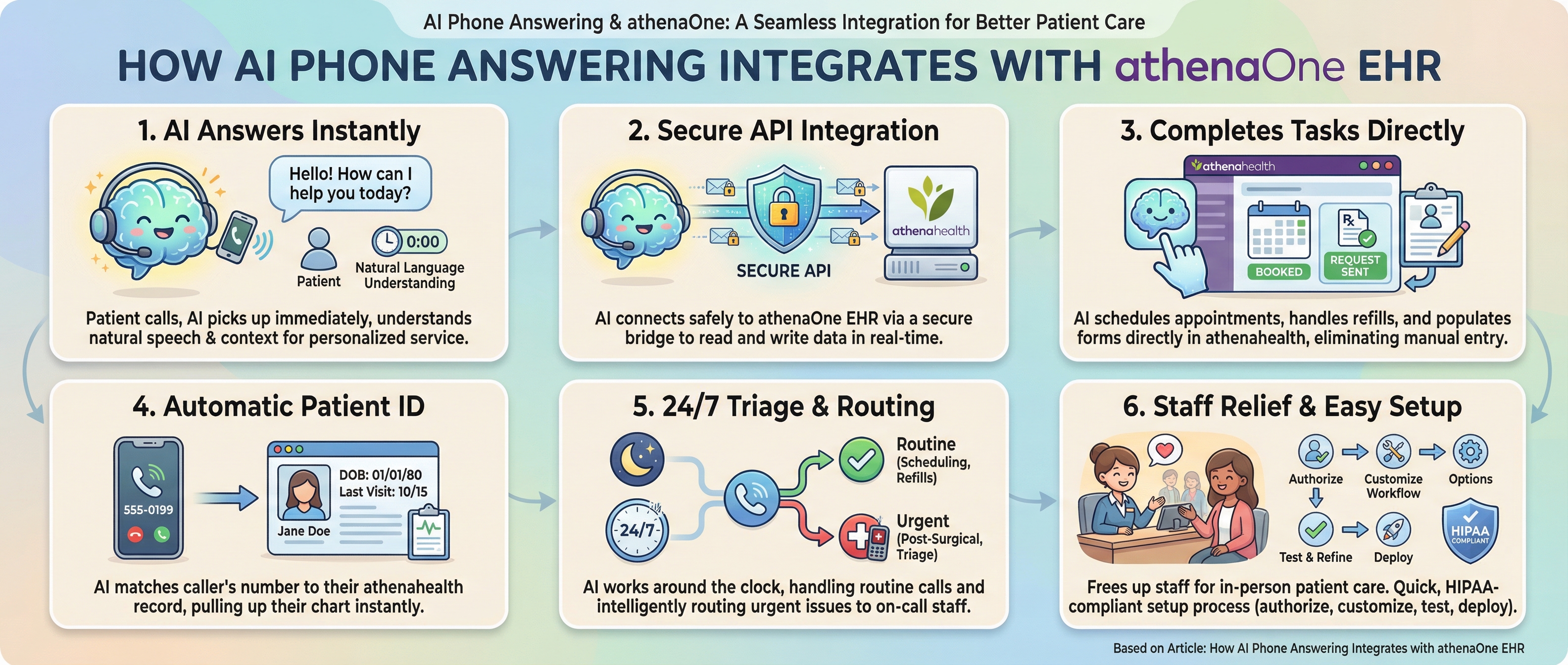
When a patient calls your practice, the AI answers immediately. It listens to what the patient says, figures out their intent, and takes action. If someone wants to schedule a visit, the AI checks your calendar and books it. If they need a refill, the AI logs the request and sends it to your care team. The patient gets help in seconds.
Traditional phone trees force callers to press buttons and navigate menus. AI phone assistants are different. They understand natural speech, so patients can just say what they need. The AI also connects directly to your EHR, which means it knows who is calling and can pull up their chart before the conversation even starts.
The AI phone assistant connects to athenahealth through an API, which is a secure bridge that lets two software systems talk to each other. This connection allows the AI to read patient records, check appointment availability, and write information back to your EHR in real time.
When a patient calls, the AI matches their phone number to a record in athenahealth and pulls up their chart. It can see their demographics, medical history, upcoming appointments, and pending prescriptions. This happens in the first few seconds of the call, so the AI can personalize the conversation immediately.
The key difference from older systems is that the AI actually completes tasks in athenahealth. It doesn't just take messages for your staff to enter later. When a patient books an appointment through the AI, that appointment appears in athenahealth instantly. When the AI collects intake information, it populates the patient's chart automatically.
The AI uses the incoming phone number to find the patient in athenahealth. If the caller is already in your system, the AI retrieves their full record. If they're new, the AI collects their information and creates a patient chart. Either way, your staff sees a complete record without entering anything manually.
When a patient asks to schedule an appointment, the AI checks athenahealth's live calendar. It sees which providers are available, what appointment types are open, and which locations have slots. The AI can then offer options to the patient and book the visit on the spot. If the patient needs to reschedule or cancel, the AI updates athenahealth immediately.
Every call generates documentation that flows directly into athenahealth. Call summaries, intake forms, and prescription requests all appear in the patient's chart. The AI can also route urgent calls to the right provider or department based on rules you define. A post-surgical concern might page the on-call physician, while a billing question goes to your front desk.
Your front desk team spends hours every day answering the same questions. What are your hours? Can I reschedule my appointment? Is my prescription ready? These calls are important, but they pull staff away from patients who are physically in your office.
An AI phone assistant handles routine calls instantly, so your team can focus on the waiting room. When the phone stops ringing constantly, your receptionists can greet patients, process check-ins, and handle complex issues without interruption.
The impact is measurable. If your practice receives 150 calls per day and 60% are routine, that's 90 calls your staff doesn't need to answer. At 3 minutes per call, you free up 4.5 hours of staff time daily. With healthcare's 4.4 minute average hold time, you free up over 6 hours of staff time daily.
AI phone assistants can handle any routine patient interaction that doesn't require clinical judgment. Most practices start with their highest-volume call types and expand from there.
Patients call to book visits, move appointments, or cancel. The AI checks athenahealth's calendar, finds available slots, and confirms the booking. The patient gets an immediate confirmation, and your schedule updates automatically.
A patient calls asking for a refill of their medication. The AI collects the prescription details and pharmacy information, logs the request in athenahealth, and notifies the prescribing provider for approval. The entire interaction takes less than 2 minutes.
When a patient calls at 9 PM with a concern about post-procedure symptoms, the AI recognizes the urgency. It documents the issue in the chart and pages the on-call provider immediately. Non-urgent calls get logged for your staff to review the next morning.
New patients often call to schedule their first appointment. The AI collects insurance information, medical history, and reason for visit. This information populates athenahealth's intake forms before the patient arrives, saving 10 to 15 minutes of paperwork at check-in.
Patients frequently ask whether their plan covers a specific procedure or what their copay will be. The AI can check notes in athenahealth and provide accurate information. If the question is complex, the AI routes the call to your billing team.
Not every AI phone system works well with athenahealth. Some vendors offer basic integrations that still require manual data entry. Others have deep, tested connections that let the AI complete tasks directly in your EHR.
When evaluating options, I recommend checking for certified integration with athenaOne, HIPAA compliance with a signed Business Associate Agreement, and the ability to customize workflows for your specialty. A pediatric practice has different needs than a cardiology group, and your AI should reflect that.
| Feature | Why it matters |
|---|---|
| Direct API integration with athenaOne | Appointments, demographics, and notes sync in real time without manual entry. |
| HIPAA compliance and encryption | Patient data stays protected and your practice stays compliant. |
| Customizable call routing | You define which calls go where and what information to collect. |
| Natural conversation flow | Patients get a human-like experience instead of robotic prompts. |
| Multi-location support | Centralized oversight with location-specific customization. |
Test the AI with a sample call before you commit. Ask the vendor for references from other athenahealth practices in your specialty. A platform built by practicing physicians will understand clinical workflows better than one designed for general business use.
When you connect an AI phone system to athenahealth, patient data flows between two platforms. This creates compliance obligations that you need to take seriously.
I always verify that the AI vendor is HIPAA-certified, maintains encryption at every step, and has undergone independent security audits. The vendor should also sign a Business Associate Agreement, which is a legal document stating they will handle your patient data according to HIPAA rules.
Most AI phone systems can be deployed within 2 to 4 weeks. The process involves connecting your athenahealth account to the AI platform, customizing call workflows, and testing the system before going live.
You give the AI vendor permission to access athenahealth through the API. The vendor configures the integration and maps your patient data fields. This typically takes 3 to 5 business days.
You define which calls the AI should handle, how urgent cases get routed, and what information to collect. A platform built by physicians will help you configure specialty-specific protocols that match how your practice actually operates.
The AI runs alongside your existing phone setup for 1 to 2 weeks. You monitor calls, gather feedback from staff, and adjust workflows as needed. This parallel testing period helps you catch issues before full deployment.
Once you're confident the system works correctly, you switch it live. Ongoing monitoring helps you optimize performance over time and expand the AI's capabilities as your practice grows.
Most patients appreciate getting an instant response rather than waiting on hold, especially since negative phone interactions make patients four times more likely to switch providers. The AI sounds natural, so many callers don't realize they're speaking to software. If a patient prefers a human, the AI transfers them immediately.
Yes. Most AI phone systems support multilingual conversations. Spanish-speaking patients or other language groups can get help in their preferred language without needing a bilingual staff member available.
The AI recognizes when it's uncertain and transfers the call to a staff member. You can also set rules so certain call types always go to humans, like complex clinical questions or upset callers.
No. The AI handles routine calls so your staff can focus on patients in the office. Most practices use the freed-up time for better in-person service, not layoffs.
Pricing varies by vendor and call volume. Most charge a monthly fee starting around $100 to $300, with higher tiers for practices that handle more calls or need advanced features.

AI-Enhanced Healthcare with Insight Health
