How to Automate Medical Fax Processing in Your Clinic
How to automate medical fax processing in your clinic


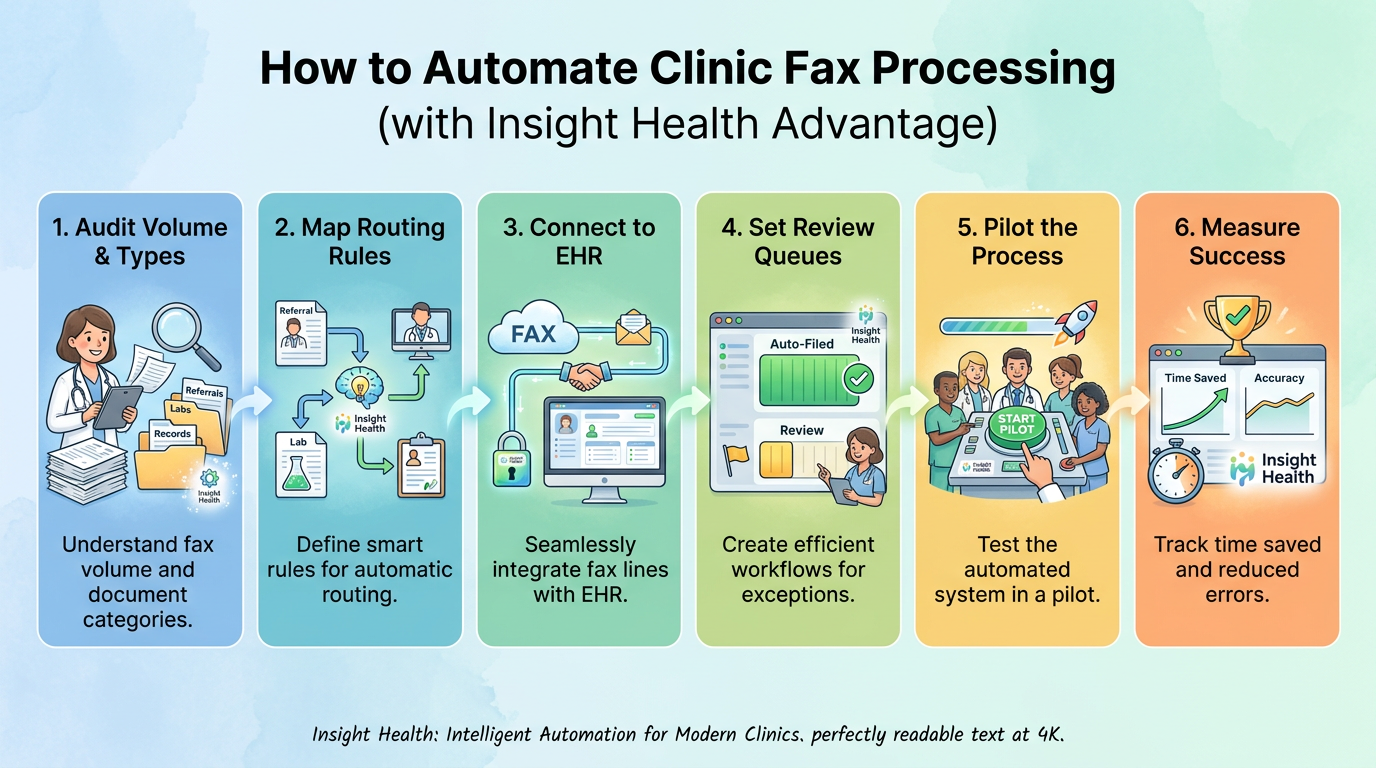
Automating medical fax processing means software does the sorting your staff now does by hand. It captures each fax, sorts it by type, splits packets, pulls the data, matches the patient, and files it in your electronic health record (EHR). Staff review only the exceptions.
This guide covers how to automate medical fax processing in a clinic in five steps. You will audit your volume, map routing rules, connect your fax lines and EHR, set review queues, and run a measured pilot. We wrote it for operations leaders at specialty groups, health systems, and management services organizations (MSOs), which run shared services across sites.
Digital fax is a different thing. It turns paper into a PDF, but a person still opens, reads, renames, and files each one. Here is the test for any automated fax setup: after go-live, did staff touches per fax go down?
Many groups sit somewhere in between. In the March 2026 MGMA Stat fax poll, 24% of practices reported no digital fax solution fully integrated with their EHR/PM and workflows. The poll had 292 responses, and Insight Health sponsored it, so read it as a signal rather than a national estimate.
Our platform was built with practicing physicians who are also our co-founders. That shaped one rule we keep: humans stay on the exceptions by design. For more context on the fax burden, see our 2026 phone and fax report.
At a specialty group, the fax line carries referrals, outside records, lab results, and prior authorization paperwork. Prior authorization is the insurer approval required before certain services, and we will call it prior auth from here. Each item has to be read, matched, and acted on before anyone gets scheduled.
Hospitals are often on the other end of that line. The ONC hospital exchange data shows that in 2025, 35% of hospitals often and 46% sometimes received summary-of-care records by mail or fax. Those figures cover hospitals only, not clinics.
Prior auth adds steady volume. In the 2025 AMA prior authorization survey, physicians reported that practices complete 40 prior auths per physician, per week. They also reported 13 hours a week of physician and staff time on that work.
Medical fax automation sits inside a larger shift. The 2025 CAQH Index report estimates the industry avoided $258 billion in administrative costs in 2024 through automation. That figure covers administrative transactions broadly, not fax, so your own baseline matters more.
When a referral sits in a stack, the patient may book somewhere else. That is referral leakage, and it shows up in your new patient volume.
Before you change anything, count what arrives. Run the audit for one to two weeks across every fax line and location. A second week smooths out a slow or unusually busy stretch.
Capture these numbers in one baseline sheet:
You will compare against this sheet in Step 5. If you want a second set of eyes, start with our free referral workflow assessment.
Next, decide where each document type goes and who owns it. That list is your taxonomy, the set of categories the system sorts into. Routing rules are the if-then logic that sends each category to a work queue, a shared task list for one team.
Every practice needs its own taxonomy. A typical schema might have six categories: New Patient Referral, Psych-Only Referral, Prescription Refill, Authorization, Medical Records Request, and Non-Clinical. Start from the table below and adjust it to your teams.
An in-basket is the EHR inbox where clinicians see results and messages.
Plan for packets as well, meaning several documents sent as one fax. Referral faxes can run many pages and combine a referral, notes, labs, and an insurance card. The system must split that packet and route each part.
A few rules prevent quiet failures:
For that reason, our Fax AI Agent supports 80+ specialties with specialty-aware logic. You can see how classification, packet splitting, and extraction work in AI document processing with MagicDocs. Referrals then move toward a booked visit through AI referral management.
Now bring every inbound channel into one place. That means each fax line, e-fax inbox, portal upload, and scanned record across all your locations. Leave one line out and part of your work stays manual.
An AI fax agent is software that owns the fax line, reading and routing each document as it arrives. Our Fax AI Agent captures each of those channels into one queue. Start from what you already run, such as RightFax, email forwarding, or SFTP, a secure file transfer method.
Then decide how work reaches the chart. EHR write-back means the system files the document and its data straight into the patient's chart. A separate inbox means staff still move each item by hand, which keeps touches high.
Write-back depends on patient matching, which links each fax to the right patient record. Check our supported EHR integrations before you set a go-live date.
Bring IT and security in early, since they gate most enterprise rollouts. Expect a review of data flows, user access, and a business associate agreement (BAA), the contract in which a vendor agrees to protect patient data.
HIPAA is the federal law that sets privacy rules for protected health information (PHI). It permits faxing PHI to another provider for treatment.
HHS guidance on faxing PHI calls for "reasonable and appropriate administrative, technical, and physical safeguards." It names no specific fax technology, so confirm your setup with your compliance team or counsel.
This step decides where people stay involved. An exception is any fax the system should not file on its own. Humans stay on the exceptions by design, and your practice decides where that line sits.
The system gives each patient match a confidence score, a number that shows how sure it is. Your practice sets the threshold. Items below it go to a review queue and never silently into the chart.
Set your rules by document risk:
Start strict. You can loosen thresholds once pilot data shows where the system is reliable.
Start with one fax line or one document type. In our rollouts, go-live takes 2 to 4 weeks, and practices see measurable return on investment (ROI) by week six. Pick a line with steady volume and a clear owner.
A pilot is where you learn how to automate medical fax processing in a clinic using your own numbers.
Track the same metrics you captured in Step 1:
Compare week by week. When the numbers hold, add the next line or document type.
For scale, here is one result. In a 30-provider gastroenterology group, administrators cut manual document review by 80%, moved four staff members to higher-value work, and saved $250,000 a year. Your results will depend on your volume and mix, which is why the baseline matters.
Six mistakes slow down most fax rollouts. Watch for these:
Coordinators know the edge cases better than anyone. Bring them into rule mapping and threshold reviews from the start.
These are the questions administrators ask most when they plan a rollout.
It depends on your volume and document mix, so measure your own baseline first. We usually process each document in under two minutes, with 80% less manual document review.
Most of the work is operational: taxonomy, routing rules, and review thresholds. Your IT team joins to connect fax lines, set up EHR access, and complete the security review.
No. Let high-confidence admin documents file on their own, and keep people on clinical exceptions, unmatched patients, and anything below your threshold.
Handwriting and poor scans are harder for any system, so we do not quote a handwriting-specific number. Our extraction accuracy reaches up to 99.5%, and low-confidence items go to staff review instead of the chart.
Ask about EHR write-back, patient matching, exception handling, audit trails, and security evidence. Our HIPAA-compliant AI fax buyer's guide walks through each question.
Pick one fax line, run the audit, and set your baseline this month. When you are ready to see where your faxes stall, get a free fax audit from our team.

AI-Enhanced Healthcare with Insight Health
