AI fax-to-EHR automation for clinics: a practical guide
Learn how AI fax to EHR automation reads, classifies, and files inbound faxes into patient charts, plus the steps to implement it in your clinic.


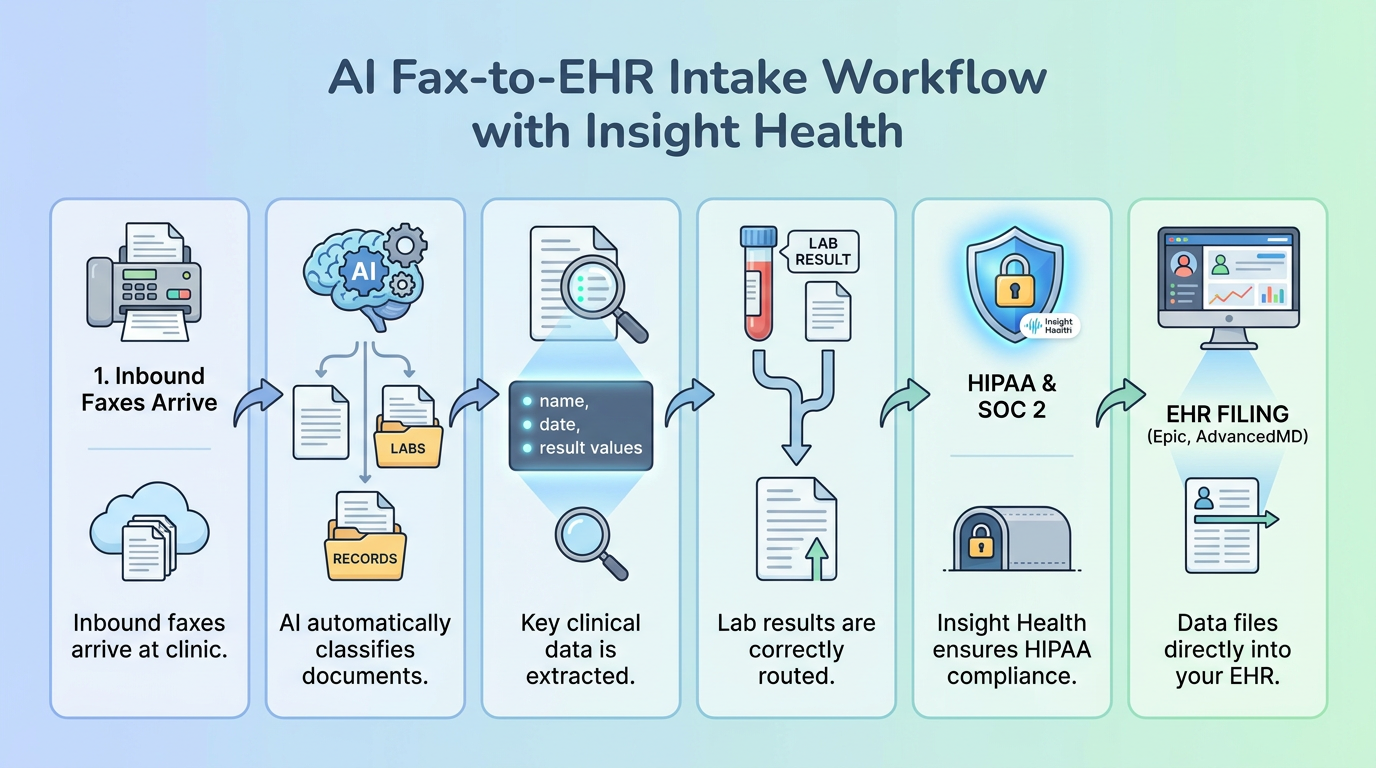
AI fax-to-EHR automation for clinics uses artificial intelligence to handle incoming faxes from start to finish. The software reads each fax, sorts it by type, pulls out the key details, and files it into the right patient chart. The EHR, or electronic health record, is the system where your patient data lives.
Plain cloud fax only sends and receives documents. Basic OCR only turns a fax image into text. AI fax-to-EHR automation goes further and understands the document, then acts on it.
Our approach is built around filing clinical documents, not just moving them. If you want the mechanics, we cover how an AI fax service works in more depth. It handles referrals, lab results, records requests, and orders.
We wrote this guide for administrators at specialty groups, MSOs, and health systems with 10 to 100+ providers.
Fax is still the default way clinics exchange clinical documents. In our ROI model, staff spend about 8 minutes per fax sorting pages and typing data into charts by hand. That slow, manual work is exactly what AI fax-to-EHR automation removes.
The pressure to move off manual fax is growing. The 2026 CMS final rule "is projected to save the healthcare industry roughly $781 million annually by establishing national standards for the electronic exchange of clinical documentation used to support health care claims." Claims attachments are documents like lab results and notes sent to support a claim.
Yet most of these documents are still not electronic. In fact, adoption is falling. The 2025 CAQH Index reports that "Attachments decreased in adoption across both medical and dental practices, decreasing from 32% and 37% in the 2024 Index, respectively, to 24% and 28%."
The burden lands on your team. The 2024 AMA prior authorization survey found that prior authorization for a single physician consumes "the equivalent of 12 hours of physician and staff time each week." For your staff, that means missed lab results and charts that fall behind.
We keep the workflow simple to follow by breaking it into steps. Each step replaces a task your staff does by hand today. Together, they move a fax from the inbox into the chart, and humans stay on the exceptions by design.
Low-confidence items go to a review queue. Below is the path every inbound fax takes. We built this flow with practicing physicians, so it matches how clinical teams actually work.
We catch the inbound fax the moment it arrives. We then use OCR, or optical character recognition, to turn the fax image into text a computer can read.
This step replaces squinting at a blurry page. Clean, readable text is what makes every later step possible.
Next, our AI decides what the document is. Classification means labeling each fax as a lab result, a referral, a records request, or an order.
We also split multi-document packets into separate items and join duplicates. Lab result classification is a strength here, because those documents are time-sensitive. This step relies on MagicDocs, our intelligent document processing layer, to read structure and context.
Our AI then pulls the key fields from the document. These include patient name, date of birth, ordering provider, result values, and dates.
Patient matching means linking that data to the correct chart in your EHR. We check name, date of birth, and other identifiers so the document lands on the right record.
Filing means placing the document and its data directly into the correct patient chart. Routing means sending it to the right provider inbox or work queue for review.
Our Fax AI Agent does both, so nothing waits in a shared folder. It files into named systems, and you can review our supported EHR integrations like Epic, AdvancedMD, and Office Practicum.
Implementation follows five steps, one location at a time.
Our FHIR R4 and HL7v2 integrations cover athenaOne, Epic, eClinicalWorks, NextGen, AdvancedMD, DrChrono, Elation, Charm Health, ModMed, iKnowMed, and Office Ally.
Here is what this asks of your staff. They review exceptions, and they don't learn a new platform.
MSOs and health systems usually run fax lines at every site with no shared view. With us, every fax line, site, and provider feeds one queue.
Routing follows location and service line. Role-based access keeps each site seeing only its own work. For your IT, security, and operations committee, the audit trail records what the AI did and what staff changed.
We see faxed lab results as the highest-value case to automate. Our AI classifies each result, matches it to the patient, sends it to the ordering provider, and files it to the chart. The same flow works for imaging reports and records requests.
Receiving a fax is not the same as true EHR integration. Among US acute care hospitals, the ONC hospital interoperability data shows that "70% of non-federal acute care hospitals engaged in all domains of interoperable exchange (send, find, receive, and integrate) routinely or sometimes in 2023," while "less than half of hospitals (43%) routinely engaged in interoperable exchange." AI filing closes that gap by writing the data into the chart, not just delivering the page.
The point of automation is what your team gets back. Below are the outcomes clinics see when faxes stop piling up. You can read more about healthcare AI fax automation and staff time savings.
Our ROI model (an estimate, not a guarantee) assumes 2,000 faxes a month, 8 minutes per fax, and a $25 hourly admin rate. On those inputs, manual processing costs $6,660 a month, compared with $1,900 with Insight Health, a $4,760 monthly saving.
Inbound faxes carry PHI, the protected health information that identifies a patient. So any AI that reads faxes must protect that data at every step. This is a core evaluation point, not a footnote.
We meet strict standards for handling inbound PHI. Our HIPAA-compliant fax handling protects data in transit and at rest. HIPAA is the federal law that sets national standards for protecting patient health information.
We also maintain SOC 2 Type II security. SOC 2 Type II is an independent audit showing security controls work over time. Our platform is built by practicing physicians who understand clinical risk.
In production, our S.A.F.E. architecture (Supervised Autonomous Framework for Evaluations) adds real-time supervision, self-evaluation, and multi-model verification. A full audit trail records what the AI did and what a person changed.
Use this checklist to compare tools as a skeptical, ROI-driven buyer. It favors depth over generic claims.
Insight Health sponsored a 2026 MGMA Stat poll on fax integration. In it, nearly 1 medical practice in 4 (24%) reports not having a digital fax solution fully integrated with its EHR/PM and workflows.
| Criterion | What to confirm |
|---|---|
| EHR filing | The tool files into your named EHR, such as Epic, AdvancedMD, or Office Practicum. |
| Clinical documents | The tool handles lab results, records, and orders, not just transport. |
| Patient matching | The tool reports field-level accuracy (ours is up to 99.5%) and sends unmatched records to staff review. |
| Compliance | The tool meets HIPAA and SOC 2 Type II for inbound PHI. |
| Specialty awareness | The tool understands your specialty's document types and workflows. |
MGMA's 2025 poll puts a number on AI adoption across medical groups. The AI adoption poll found that "nearly 7 in 10 (68%) medical groups reported adding or expanding use of AI tools in 2025." That figure covers all AI tools, led by ambient documentation and scribing, not fax alone.
The shift is from fax transport to fax intelligence. Clinics no longer want tools that only move pages. They want tools that read, understand, and file, which is what we build.
What is AI fax-to-EHR automation?
It is software that reads incoming faxes, sorts them, extracts the data, and files each one into the correct patient chart in your EHR.
Can AI route faxed lab results to the right provider?
Yes, the AI classifies the lab result, matches it to the patient, files it to the chart, and routes it to the ordering provider's inbox.
Does it work with my EHR?
Our platform integrates with named systems like Epic, AdvancedMD, and Office Practicum, so documents file directly into your existing charts.
Is AI fax processing HIPAA compliant?
Yes. We are HIPAA compliant and SOC 2 Type II certified, and we sign a business associate agreement (BAA) on paid tiers.
How is it different from cloud fax or basic OCR?
Cloud fax only transmits pages and OCR only reads text, while AI fax-to-EHR automation understands the document and files it into the chart.
Can we keep our existing fax number?
Yes. We capture faxes from your existing fax service or email, so referring offices keep faxing the numbers they use today.
What happens when a fax arrives for a patient not yet in the EHR?
Patient matching either links the document to the right chart or flags a confident new-patient create. Unmatched records go to staff with suggested resolutions and are never guessed at.
How long does setup take?
Most deployments go live in 2 to 4 weeks, starting with one fax line.
How are inbound faxes handled across multiple locations?
Every fax line and site feeds one queue, with location and service-line routing and role-based access.
Your team should not spend hours sorting faxes by hand. AI fax-to-EHR automation reads inbound faxes and files clinical documents into the EHR for you. Built by practicing physicians, our platform turns the fax inbox into faster, cleaner chart updates.

AI-Enhanced Healthcare with Insight Health
